
I finally got (back) my new prescription glasses today and I'm seeing things in a different light...so to speak. Thanks to my sis, auntie and my "uncle". The former for the (s)lending? me the moolah$ for Transitions lenses and the latter for (finally) handing me down his "old" Titanium Oakley frames (after much begging and cajoling). Hey, the theme for me nowadays, it seems, is finding new ways to make the not-so-often-looked-at-or-examined stuff and fixing-or-upgrading-it-and-making-it-work-to-my-advantage. What might have been an already discarded or forgotten set of frames is now back on my head and making me not only look cool (ok slightly cool)...but more importantly, 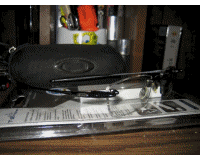 improved my eyesight (and dare I say "outlook")...I used to peer (scan closely) at the "woids" and the details become fuzzy. Now I'm not peering that much anymore (more than usual anyway), while I was trying to research on how to activate the different (like I said) oft-forgotten-features of VoIP (a segue is coming....Well, I did discover the world of "PEERING" (Ekiga.net wiki) in VoIP terms which I will discuss in detail below:
Peering closely: Peering is a feature or functionality in VoIP that allows one VoIP network provider to call/contact another VoIP network Provider simply by pre-fix dialing the correct "VoIP Provider SIP-Peer code". A very comprehensive, (well, at least imho) article is discussed on FWD site and how to locate the correct SIP Peer code can be found in the SIPBroker Whitepages (kinda like the phone directory for IP phones)
Movin Forward: Call Forwarding is, imho, another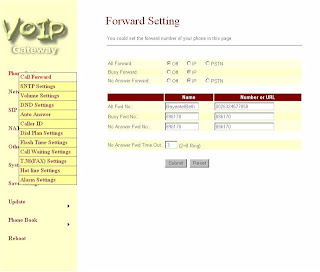 very essential yet oft-forgotten or taken-for-granted (at least where I'm from) feature of VoIP. What it does is basically, allow VoIP users to have their VoIP service forwarded to another VoIP service, and/or PSTN or Mobile service whenever they need to do so. Usually Call Forwarding is done according to these 3 user states or conditions (at least in most users' ATAs) : "When Busy", "No Answer" and "All Calls". That seems self-explanotry enough. Like I said, in each user state/condition, the calls can be forwarded or diverted to either another VoIP number or VoIP service provider, a PSTN (landline phone) or a Mobile Phone. For ATAs however, it has to be clarified that this feature is activated on the users' ATA units. In other words, the ATA (client endpoint) has to be "actively online" to forward the call. USB Softphones however, are another story, (at least in our version), the call forwarding service is really on the "server" side which means, it doesn't follow any of the states/conditions but rather, when the USB Softphone is unplugged, hence, offline, it automatically remembers to forward or divert all calls to a particular telephony service, whether it is a VoIP, PSTN or Mobile enpoint. Coupled with Peering services this is a very very useful feature to have!
 improved my eyesight (and dare I say "outlook")...I used to peer (scan closely) at the "woids" and the details become fuzzy. Now I'm not peering that much anymore (more than usual anyway), while I was trying to research on how to activate the different (like I said) oft-forgotten-features of VoIP (a segue is coming....Well, I did discover the world of "PEERING" (Ekiga.net wiki) in VoIP terms which I will discuss in detail below:
Peering closely: Peering is a feature or functionality in VoIP that allows one VoIP network provider to call/contact another VoIP network Provider simply by pre-fix dialing the correct "VoIP Provider SIP-Peer code". A very comprehensive, (well, at least imho) article is discussed on FWD site and how to locate the correct SIP Peer code can be found in the SIPBroker Whitepages (kinda like the phone directory for IP phones)
Movin Forward: Call Forwarding is, imho, another
 very essential yet oft-forgotten or taken-for-granted (at least where I'm from) feature of VoIP. What it does is basically, allow VoIP users to have their VoIP service forwarded to another VoIP service, and/or PSTN or Mobile service whenever they need to do so. Usually Call Forwarding is done according to these 3 user states or conditions (at least in most users' ATAs) : "When Busy", "No Answer" and "All Calls". That seems self-explanotry enough. Like I said, in each user state/condition, the calls can be forwarded or diverted to either another VoIP number or VoIP service provider, a PSTN (landline phone) or a Mobile Phone. For ATAs however, it has to be clarified that this feature is activated on the users' ATA units. In other words, the ATA (client endpoint) has to be "actively online" to forward the call. USB Softphones however, are another story, (at least in our version), the call forwarding service is really on the "server" side which means, it doesn't follow any of the states/conditions but rather, when the USB Softphone is unplugged, hence, offline, it automatically remembers to forward or divert all calls to a particular telephony service, whether it is a VoIP, PSTN or Mobile enpoint. Coupled with Peering services this is a very very useful feature to have!


