USB-embedded Software
Introduction
Embedded software is typically software written for special purpose hardware, not, necessarily, computer hardware. The principal purpose of embedded software is not the transformation of data, but interaction with the physical world. It may seem odd to associate USB, or "Universal Serial Bus", technology - which, after all, is most commonly associated with personal and laptop computers - with embedded systems, but every USB device is, in fact, an embedded system. USB is a serial protocol and physical link, which transmits data differentially on a single pair of copper wires at speeds up to 480Mbps ("Megabits per second"), according to the USB 2.0 standard. A USB 3.0 standard, using fibre optic cable and offering speeds of to 4.8Gbps ("Gigabits per second"), was released in 2008 and the first USB 3.0 devices are just starting to appear.
Embedded USB Software
The main advantage of USB, whatever the specification, is that it offers simple connectivity. This means, for example, that VoIP, or "Voice over Internet Protocol", users can carry so-called "softphone" software - software that allows telephone calls to be made directly from a computer - on a USB memory stick, plug it into any available USB port, say, in an Internet café and make calls for free (or, at least, at a cheap rate), without needing to install the software.
There are numerous free software products that are small enough to be run from a USB memory stick. Express Talk, for example, can be downloaded, free of charge, from the Internet, is straightforward to configure and use and occupies under 500Kb. It uses the open standard SIP protocol and is compatible with Windows XP and Windows Vista and most of the major VoIP SIP providers, so can be used make telephone calls between computers or between a computer and a standard `phone handset via a gateway.
MizuPhone is a larger product, at 95Mb, but is, once again, free for non-commercial purposes. Also based on the SIP protocol, Mizuphone allows users to connect to any SIP server on the Internet, or a LAN ("Local Area Network"). The free version is based on the same engine as the professional version, but the latter - which retails for $50, at the time of writing - includes additional features, such as G.729 and wideband codecs, file transfer over SIP, etc..
Indeed, some manufacturers actually produce USB internet modems, or "dongles", which not only afford wireless broadband Internet access, but also include embedded softphone software that allows telephone calls to be made between one IP ("Internet Protocol") address and another, or between an IP address and the PSTN ("Public Switched Telephone Network") or GSM ("Groupe Spécial Mobile) mobile networks.
Showing posts with label USB VoIP SIP Softphone dongle flash drive. Show all posts
Showing posts with label USB VoIP SIP Softphone dongle flash drive. Show all posts
Sunday, February 28, 2010


Thursday, August 7, 2008
New iCallAnywhere.net website + T2Free Media Upgrade
Hi,
Greetings from the staff of iCall Anywhere Wi-Phil Corp. We have recently moved our website to another domain. Please visit icallanywhere.net regarding our company's VoIP product offerings and services. I have endeavored to make the site as functional and upgraded some webpages links and coding. I hope it works! However, I admit there are some bugs and broken links in some of the pages, should you find them, please use the "Contact Us" link or report it to the webmaster - me =)
Speaking of upgrades, if you happen to download a T2Free Softphone, you may want to try out this Media upgrade to enhance its functionality. Just download and unpack it using WinRar or Winzip tools. Instructions are included on how to install it...it's basically just cut and pasting some files to your T2Free USB anyways. This upgrade as discussed in my previous blog below, adds a "capture video recording and playback" option while using the T2Free softphone.
Friday, April 18, 2008
"New" T2Free Softphone Feature!
The Softhphone Webcam Feature Activated


Hi all! Well, at least to anyone who has somehow managed to get lost on the Internet and ended up on my blog ;-) It's been a couple of weeks since I updated it, usually every Fridays...(if you even care) Not that I forgot or anything but things have been a bit busy for me..."babysitting" and doing development "stuff"...Nothing really significant yet but I did manage to "rediscover" a new feature update to the the T2Free Softphone (see the picture on the left...with the handsome guy? ;-) Well, that's not Brad Pitt ok?? Brad doesnt wear glasses, Brad Spit ;-) maybe...Anyways, it shows the "basic" webcam feature of the softphone...Actually, if no one else is online, it will just show the "handsome user"...If anyone is on the other end of the chat, it will show another screen in the middle...
Now the picture on the right of your screen will show the same softphone but "updated" with a  Media Player/Recorder (if you notice in the sliding menu, there is a Media Center after the Webcam?) , so that you can..duh!, record both video and audio of the other person you're chatting with. I will try to show a "better" picture next time...
 Media Player/Recorder (if you notice in the sliding menu, there is a Media Center after the Webcam?) , so that you can..duh!, record both video and audio of the other person you're chatting with. I will try to show a "better" picture next time...
Friday, March 7, 2008
Features: Peering Forward @ the Future

I finally got (back) my new prescription glasses today and I'm seeing things in a different light...so to speak. Thanks to my sis, auntie and my "uncle". The former for the (s)lending? me the moolah$ for Transitions lenses and the latter for (finally) handing me down his "old" Titanium Oakley frames (after much begging and cajoling). Hey, the theme for me nowadays, it seems, is finding new ways to make the not-so-often-looked-at-or-examined stuff and fixing-or-upgrading-it-and-making-it-work-to-my-advantage. What might have been an already discarded or forgotten set of frames is now back on my head and making me not only look cool (ok slightly cool)...but more importantly,  improved my eyesight (and dare I say "outlook")...I used to peer (scan closely) at the "woids" and the details become fuzzy. Now I'm not peering that much anymore (more than usual anyway), while I was trying to research on how to activate the different (like I said) oft-forgotten-features of VoIP (a segue is coming....Well, I did discover the world of "PEERING" (Ekiga.net wiki) in VoIP terms which I will discuss in detail below:
Peering closely: Peering is a feature or functionality in VoIP that allows one VoIP network provider to call/contact another VoIP network Provider simply by pre-fix dialing the correct "VoIP Provider SIP-Peer code". A very comprehensive, (well, at least imho) article is discussed on FWD site and how to locate the correct SIP Peer code can be found in the SIPBroker Whitepages (kinda like the phone directory for IP phones)
Movin Forward: Call Forwarding is, imho, another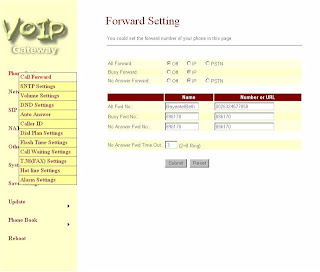 very essential yet oft-forgotten or taken-for-granted (at least where I'm from) feature of VoIP. What it does is basically, allow VoIP users to have their VoIP service forwarded to another VoIP service, and/or PSTN or Mobile service whenever they need to do so. Usually Call Forwarding is done according to these 3 user states or conditions (at least in most users' ATAs) : "When Busy", "No Answer" and "All Calls". That seems self-explanotry enough. Like I said, in each user state/condition, the calls can be forwarded or diverted to either another VoIP number or VoIP service provider, a PSTN (landline phone) or a Mobile Phone. For ATAs however, it has to be clarified that this feature is activated on the users' ATA units. In other words, the ATA (client endpoint) has to be "actively online" to forward the call. USB Softphones however, are another story, (at least in our version), the call forwarding service is really on the "server" side which means, it doesn't follow any of the states/conditions but rather, when the USB Softphone is unplugged, hence, offline, it automatically remembers to forward or divert all calls to a particular telephony service, whether it is a VoIP, PSTN or Mobile enpoint. Coupled with Peering services this is a very very useful feature to have!
 improved my eyesight (and dare I say "outlook")...I used to peer (scan closely) at the "woids" and the details become fuzzy. Now I'm not peering that much anymore (more than usual anyway), while I was trying to research on how to activate the different (like I said) oft-forgotten-features of VoIP (a segue is coming....Well, I did discover the world of "PEERING" (Ekiga.net wiki) in VoIP terms which I will discuss in detail below:
Peering closely: Peering is a feature or functionality in VoIP that allows one VoIP network provider to call/contact another VoIP network Provider simply by pre-fix dialing the correct "VoIP Provider SIP-Peer code". A very comprehensive, (well, at least imho) article is discussed on FWD site and how to locate the correct SIP Peer code can be found in the SIPBroker Whitepages (kinda like the phone directory for IP phones)
Movin Forward: Call Forwarding is, imho, another
 very essential yet oft-forgotten or taken-for-granted (at least where I'm from) feature of VoIP. What it does is basically, allow VoIP users to have their VoIP service forwarded to another VoIP service, and/or PSTN or Mobile service whenever they need to do so. Usually Call Forwarding is done according to these 3 user states or conditions (at least in most users' ATAs) : "When Busy", "No Answer" and "All Calls". That seems self-explanotry enough. Like I said, in each user state/condition, the calls can be forwarded or diverted to either another VoIP number or VoIP service provider, a PSTN (landline phone) or a Mobile Phone. For ATAs however, it has to be clarified that this feature is activated on the users' ATA units. In other words, the ATA (client endpoint) has to be "actively online" to forward the call. USB Softphones however, are another story, (at least in our version), the call forwarding service is really on the "server" side which means, it doesn't follow any of the states/conditions but rather, when the USB Softphone is unplugged, hence, offline, it automatically remembers to forward or divert all calls to a particular telephony service, whether it is a VoIP, PSTN or Mobile enpoint. Coupled with Peering services this is a very very useful feature to have!
Friday, February 8, 2008
iCall4Service Web-based Softphone

Kung Hei Fat Choi to everyone! Whoever found their way to my blog that is...that's Happy New Year in Chinese. If anyone is "interested" to know its already officially the Year of the Rat in the Chinese Zodiac...if you are that "astrological", you also might well know, that the Rat was the first one to reach the Emperor in Heaven amongst the 12 zodiac animals...making this year (which in itself is considered lucky cause its a leap year and also it ends with an "8") re-cycle of the zodiac...a very auspicious time, or so I'm told to "restart" once life, love and luck too ;-)
Anyways, I digress, what I really need to start is this blog which I "promised" to update every Friday...well, I'm going to try to begin (and keep it brief too! ;-) yeah, right!
Last blog, I discussed the advantages of having our T2Free USB Softphone to carry around when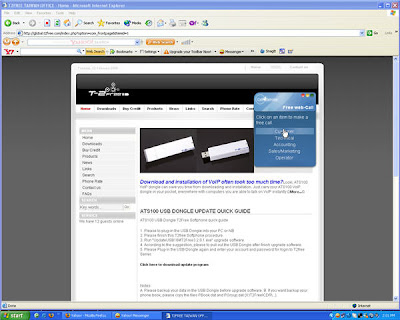 one goes around traveling all over (which I hope to do like a rat this year) wherever but still wants to keep in touch with everyone else (colleagues, friends, relatives..mommy...and that special someone --- hey, gotta throw this in coz Valentines day is coming..) in a very easy and inexpensive, even free way of making unlimited long distance calls across the miles...Since the softphone can easily be carried around (duh! its a dongle), already complete with its own
soundcard, earphones and mic, plus no installation and configuration is required (just plug and call) it really becomes very convenient. However, what if people (say, customers) who don't know how to contact you (or knows how but doesn't want to make a long distance call ) wants to reach you? (or maybe they don't know you're online...) Well, the nice thing, and sometimes most often forgotten thing about VoIP softphones (especially, SIP, short for Session Initiation Protocol) is that it is very very flexible yet also very SImPle...especially when its in a softphone "mode". Ok, let me just simplify this a bit...SIP for VoIP (softphone) is kinda like HTTP for URL (browser)...when you want to "find" someone or something online you simply open your web browser and type in the URL (say google.com) and you get links...and click...voila! you get the person or info you're looking for (ok, too simplified) Well, when someone is on SIP...they can also be contacted or "called" just by opening a browser, type in the URL (in this case, http://www.t2free.com/ - coz that's we're linked at this time), look for the Call4Service floating applet thingie (it looks like a Web Softphone)..and voila! again choose and click on a "link" --say Customer Service, Technical, Accounting etc. (it could just as easily be people's names) and then instead of taking you to a webpage...an actual call is being made as it rings (you can even see the person on the other end with video-streaming webcam---well sometimes, the Chinese lady is kinda shy)...(oh I forgot, you the caller should have working speakers and a microphone (webcam, optional). Thereby, saving you - the caller/customer "airtime rates"...just think of it like calling a 1800 or 1900 ;-) number...toll-free! Ok, now you think..well, what if the other party (with the SIP softphone) is not "online" when you initiated the Click-to-Call (this incidentally, is used in http://www.ebay.com/)??? Again, SImPle...our T2Free softphones (when unplugged, basically not online) has the capability to forward calls to mobile phones, landlines, voicemail, and even voice-emailed..and well, maybe later on..via SMS (texting). Like I said, SIP is so flexible..especially when its on a softphone....
Anyways, I'll be discussing these in more detail and with more pictures next time...I "smell a rat" ;-) our iCall4Service still hasn't re-appeared on our website: icallanywhere.com
Anyways, I digress, what I really need to start is this blog which I "promised" to update every Friday...well, I'm going to try to begin (and keep it brief too! ;-) yeah, right!
Last blog, I discussed the advantages of having our T2Free USB Softphone to carry around when
 one goes around traveling all over (which I hope to do like a rat this year) wherever but still wants to keep in touch with everyone else (colleagues, friends, relatives..mommy...and that special someone --- hey, gotta throw this in coz Valentines day is coming..) in a very easy and inexpensive, even free way of making unlimited long distance calls across the miles...Since the softphone can easily be carried around (duh! its a dongle), already complete with its own
soundcard, earphones and mic, plus no installation and configuration is required (just plug and call) it really becomes very convenient. However, what if people (say, customers) who don't know how to contact you (or knows how but doesn't want to make a long distance call ) wants to reach you? (or maybe they don't know you're online...) Well, the nice thing, and sometimes most often forgotten thing about VoIP softphones (especially, SIP, short for Session Initiation Protocol) is that it is very very flexible yet also very SImPle...especially when its in a softphone "mode". Ok, let me just simplify this a bit...SIP for VoIP (softphone) is kinda like HTTP for URL (browser)...when you want to "find" someone or something online you simply open your web browser and type in the URL (say google.com) and you get links...and click...voila! you get the person or info you're looking for (ok, too simplified) Well, when someone is on SIP...they can also be contacted or "called" just by opening a browser, type in the URL (in this case, http://www.t2free.com/ - coz that's we're linked at this time), look for the Call4Service floating applet thingie (it looks like a Web Softphone)..and voila! again choose and click on a "link" --say Customer Service, Technical, Accounting etc. (it could just as easily be people's names) and then instead of taking you to a webpage...an actual call is being made as it rings (you can even see the person on the other end with video-streaming webcam---well sometimes, the Chinese lady is kinda shy)...(oh I forgot, you the caller should have working speakers and a microphone (webcam, optional). Thereby, saving you - the caller/customer "airtime rates"...just think of it like calling a 1800 or 1900 ;-) number...toll-free! Ok, now you think..well, what if the other party (with the SIP softphone) is not "online" when you initiated the Click-to-Call (this incidentally, is used in http://www.ebay.com/)??? Again, SImPle...our T2Free softphones (when unplugged, basically not online) has the capability to forward calls to mobile phones, landlines, voicemail, and even voice-emailed..and well, maybe later on..via SMS (texting). Like I said, SIP is so flexible..especially when its on a softphone....
Anyways, I'll be discussing these in more detail and with more pictures next time...I "smell a rat" ;-) our iCall4Service still hasn't re-appeared on our website: icallanywhere.com
Friday, February 1, 2008
VoIP gadget: USB Softphone Dongle

Well, as promised (mostly to myself) I'm back with my second post on this blog about VoIP (which for those of you not yet in the know stands for Voice over Internet Protocol) and for those who do know..well, its basically the more technical term for those using Skype, or Yahoo, or MSN or some other fancy instant messaging (IM) or "unified messaging" (UM) system that you can easily find, subscribe/register , download, and install to your computer to "make Internet voice calls"(provided that speakers and microphone are also installed on the PC your using it on)...again, only for those who know how to use it...Basically, however, the above IM systems I mentioned are mostly and primarily used for "internet chat"...not for voice calling...well, at least in my part of the world. Thus, some typing skills are usually required (unless of course, the other party doesnt mind waiting for you to find and type the letters "f" "c" "u" or "k"...hehehe ;-) or correspondingly, you dont know any "internet speak" like "LMAO", "BRB", "LOL"...etc.. And, as I also mentioned, user(s) would still need to download, install and be subscribed to the same IM service (usually) to begin any communication...so it begs the question(s): What if one doesnt know or types very slowly??? (like well, your grandmother for instance ---or like my Dad, my mom, aunts..and uncles...ok, people who were born before computers were invented and the Internet was some sci-fi thingie) Or, it could be that Yahoo Messenger (not very likely) or Skype or MSN is not installed on the PC you happen to use??? Or, what if the hardware required like a microphone or speakers (soundcard) is not available or is simply broken???
What then??? Then you'll need to make a voice call....You could say, well I can voice chat over Yahoo Messenger or MSN Messenger or Skype...but again...what if the other person you want to talk to is not in front of his PC?? Or he doesnt have any of the IM installed or doesnt have any microphone or speakers? Or he or she is simply offline...then you can't right??..you'll have to dial and call them some other way....Use your cellphone and make an IDD call? Hello??? Rates will be quite expensive. Find a payphone card service? Good luck! Text them! Well, probably, it'll be a lot cheaper...and if you're Filipino..this would work, but you wont have that "real-time" reply as you would talking to them over the phone....so what to do???? Hmmmmm....Let's give you a hand...
 iCall's solution: The Softphone USB Dongle (as pictured on the left and on the right) Plankton and Sharkie (not included in design)
As you can see, it comes with its own earphone and microphone set (Stereo sound) as well as built-in soundcard. So if the PC you happen to use has crappy speakers or sound system, just plug in the dongle and you'll be able to listen to your music in stereo and in private. So that solves any "hardware" issues I mentioned above. Now what about "software"??? What do I use for an IM system?? Well, the usb dongle also comes pre-installed with its own T2Free Softphone (see below), which can make IDD voice calls to landline, mobile or other T2Free gadgets all over the world (internet access required of course). Just plug it into a usb hub and it will launch the softphone pictured below in a matter of seconds...then just dial...or you can also use its built-in Phonebook to store numbers you often call. Plus, it also stores missed calls, called numbers and numbers that called the Softphone. But wait, there's more! Like most IM applications, it has its own Webcam screen where you can not only view the person you're talking too...but also record the video (webcam hardware not included) if you wish to do so. And, with advance subscription services, you can also have calls forwarded to your mobile phone or landline (fees applied) for the times you're offline or when the usb is not connected to the internet. Finally, (and best of all) , since the softphone firmware is embedded in a USB drive, you don't need to download and install it...so you'll be able to use it any PC!*

*running WindowsXP or higher
Next week: Customized VoIP SIP Softphone for Webcalls.
What then??? Then you'll need to make a voice call....You could say, well I can voice chat over Yahoo Messenger or MSN Messenger or Skype...but again...what if the other person you want to talk to is not in front of his PC?? Or he doesnt have any of the IM installed or doesnt have any microphone or speakers? Or he or she is simply offline...then you can't right??..you'll have to dial and call them some other way....Use your cellphone and make an IDD call? Hello??? Rates will be quite expensive. Find a payphone card service? Good luck! Text them! Well, probably, it'll be a lot cheaper...and if you're Filipino..this would work, but you wont have that "real-time" reply as you would talking to them over the phone....so what to do???? Hmmmmm....Let's give you a hand...
 iCall's solution: The Softphone USB Dongle (as pictured on the left and on the right) Plankton and Sharkie (not included in design)
As you can see, it comes with its own earphone and microphone set (Stereo sound) as well as built-in soundcard. So if the PC you
 happen to use has crappy speakers or sound system, just plug in the dongle and you'll be able to listen to your music in stereo and in private. So that solves any "hardware" issues I mentioned above. Now what about "software"??? What do I use for an IM system?? Well, the usb dongle also comes pre-installed with its own T2Free Softphone (see below), which can make IDD voice calls to landline, mobile or other T2Free gadgets all over the world (internet access required of course). Just plug it into a usb hub and it will launch the softphone pictured below in a matter of seconds...then just dial...or you can also use its built-in Phonebook to store numbers you often call. Plus, it also stores missed calls, called numbers and numbers that called the Softphone. But wait, there's more! Like most IM applications, it has its own Webcam screen where you can not only view the person you're talking too...but also record the video (webcam hardware not included) if you wish to do so. And, with advance subscription services, you can also have calls forwarded to your mobile phone or landline (fees applied) for the times you're offline or when the usb is not connected to the internet. Finally, (and best of all) , since the softphone firmware is embedded in a USB drive, you don't need to download and install it...so you'll be able to use it any PC!*
*running WindowsXP or higher
Next week: Customized VoIP SIP Softphone for Webcalls.
Subscribe to:
Posts (Atom)


