
Happy (Belated) Valentines day to all (well, at least, to those who had celebrated it) Anyways,I almost forgot to do this post today [insert "shockedisgusted" expression here]. I won't go too much into details why I would have "failed" to keep my promise of religiously doing my "every-Friday blogposts" but it involves 1)not really knowing what to write about, 2) some post-Valentine "blues", the dinuguan (pork blood stew) I ate today...and [insert more "shockedisgusted" + embarrassed expression here again] 3)watching a weekly Pinoy tear-jerker on tv just to...well, let's just say a girl is involve...which I have a uhmmm..."soft-spot" for; so, for the sake of "acting" I had to watch it and be "open" about it (although to be honest, I'd rather have "open-heart" surgery than watch the stuff)...Hey, Valentine's day was just yesterday (i'm entitled to some "mushiness" sometimes)...Speaking of "soft-spots"...I'd like to segue to one of our "softphones" which was recently customized and "opened"
To be continued (sorry!)...I'm still "reeling" from the show I just watched [inserting my head into something...]Sorry! ...ok enough of the "bad acting"...I'm continuing this from yesterday actually (I fell asleep after the show ended)...I had to "consult"...uhmm...my conscience and if I should continue to "compromise" my standards and do stuff I won't normally do just because....nevermind...I digress again...
Anyways, I've prepared some pics of our original SIP T2Free softphone (shown on the left) w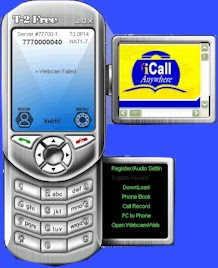 hich is currently "locked" into automatically registering itself to our parent company Astarte. As you can see (generally), all the needed Options are already shown on the Menu e.g. Registration, Reloading (Credits), Call Records (CDR), Phonebook, Call Transfer and even a Webcam (which slides out) is cleanly integrated into a very "conventional" looking phone. It's design and outlook makes it much easier to use it intuitively as it looks very much like a cellphone. However, this design is currently only available for T2Free subscribers with active (861000) accounts and of course, iCall Anywhere's embedded 77700 series of SIP nos. Hence, it is still in an "exclusive and locked" state at this time. However, I will soon work out a system that will allow "free" users' testing for a limited period. In the meantime, those who would want the opportunity to test it out, please leave your email address in the comments section.
To be continued (sorry!)...I'm still "reeling" from the show I just watched [inserting my head into something...]Sorry! ...ok enough of the "bad acting"...I'm continuing this from yesterday actually (I fell asleep after the show ended)...I had to "consult"...uhmm...my conscience and if I should continue to "compromise" my standards and do stuff I won't normally do just because....nevermind...I digress again...
Anyways, I've prepared some pics of our original SIP T2Free softphone (shown on the left) w
 hich is currently "locked" into automatically registering itself to our parent company Astarte. As you can see (generally), all the needed Options are already shown on the Menu e.g. Registration, Reloading (Credits), Call Records (CDR), Phonebook, Call Transfer and even a Webcam (which slides out) is cleanly integrated into a very "conventional" looking phone. It's design and outlook makes it much easier to use it intuitively as it looks very much like a cellphone. However, this design is currently only available for T2Free subscribers with active (861000) accounts and of course, iCall Anywhere's embedded 77700 series of SIP nos. Hence, it is still in an "exclusive and locked" state at this time. However, I will soon work out a system that will allow "free" users' testing for a limited period. In the meantime, those who would want the opportunity to test it out, please leave your email address in the comments section.
Moving on, as my blog title states, I will also be showing you the "Open" version of the same SIP Softphone as shown above. Except this time, the design has been altered (radically, I might add) 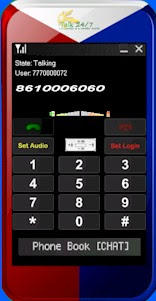 to suit our clients' specifications and orders, which is: "Keep it Simple and Secure" (KISS)...i am tempted to poke pun on this but...anyways, as you can see on the right, it was even made simpler yet still fully functional (in fact, even has an added bonus) and as requested, secured with encryption. It's biggest advantage however over the more functional and integrated T2Free softphone is that it is able connect or get itself configured to connect to any SIP Provider that is able to provide it with its SIP Proxy IP address in the "conventional" format.
 to suit our clients' specifications and orders, which is: "Keep it Simple and Secure" (KISS)...i am tempted to poke pun on this but...anyways, as you can see on the right, it was even made simpler yet still fully functional (in fact, even has an added bonus) and as requested, secured with encryption. It's biggest advantage however over the more functional and integrated T2Free softphone is that it is able connect or get itself configured to connect to any SIP Provider that is able to provide it with its SIP Proxy IP address in the "conventional" format.


